3D Stereo Base Calculations


Recently I have been taking close-up photos of flowers in 3D stereo and needed to find the best formula to compute the interaxial camera separation distance. Since my subject is not moving I was able to use a single camera on a tripod mounted slider to shoot sequential left and right eye view photos (the cha-cha method). The question is how far (interaxial distance) to move the camera to photograph the flower to give the most comfortable viewing experience for the 3D stereo photo. Normally I might use the quick 1:30 ratio rule for the stereo base calculation, (1/30 of subject distance), but I wanted an accurate measurement for my camera lens and studio setup. The 1/30 rule breaks down for close-ups.

I did some research on the Internet and found a good reference for stereo base calculation. See http://nzphoto.tripod.com/stereo/3dtake/fbercowitz.htm   (note: Bercovitz name in URL is misspelled). The author, John Wattie, summarized the various formulas used to calculate the stereo base. 

Other references I found are:

An important research paper by John Bercovitz, "Image-side Perspective and Stereoscopy",
IS&T/SPIE’s Stereoscopic Displays and Applications IX, (January 1998, San Jose, California, USA), vol.3295, pg 288-298, is cited by many researchers interested in stereo base calculation for accurate and comfortable stereo viewing.

The distance to the flowers I shot in 3D was less than 1 meter, so I used the Davis modified Bercovitz formula for close-ups, as described by Wattie. For example, the above photo, used a 50 mm focal length lens, at .838 meters from the flower, with a white background at 1.118 meters. The calculated interaxial distance was 38.4 mm. The 1:30 rule gives a stereo base of 28 mm. 

I shot the flower at different base distances of 20, 40, 60, and 80 mm. The 40 mm stereo base distance seemed to produce the best 3D photo.

Later, I found out about the Numworks.com graphing calculator for high school students. It's an open source platform and uses micro Python. Students can write formulas in Python and save on the device. I bought the calculator and coded the formulas that I would need for future stereo base calculation.

The link is to the downloadable Python code for use with the Numworks calculator is:

I reproduced the source code listing below. You may convert this code into other programming languages and calculators:
For 3D photography, calculate the stereo base for dual left and right cameras or sequential left and right eye photos from a single camera. The calculated base (mm) gives the most comfortable viewing experience for the stereo photo. Use different formulas for normal, close-up, or macro photography.
## 3D Photography: Stereo base calculation
# For dual camera stereo configuration
# or single camera sequential L/R base separation
# Assumes 35mm equivalent lens focal length
# P parallax for standard 35mm film - 36mm x 24 mm
# P = 1.2 for 1/30 of 36mm width, 3.33% deviation
# Assumes 3.33% is maximum deviation for comfortable viewing
# This is the standard 1/30 rule.
# F lens focal length mm
# N near subject distance mm
# L background distance mm
# B interaxial distance mm between left and right camera
# Reference: http://nzphoto.tripod.com/stereo/3dtake/fbercowitz.htm
# Bercovitz formula for dual camera separation
def base(F, N, L, P=1.2):
    B=P*((L*N)/(L-N))*(1/F-(L+N)/(2*L*N))
    return B
# same as base()
def b(F, N, L, P=1.2):
    B=P/(L-N)*(L*N/F-(L+N)/2)
    return B
def near(F, B, L, P=1.2):
    t=B/P
    N = (L*(t + 0.5))/(t+L/F-0.5)
    return N
# Davis modification of Bercovitz formula for close-up photography
# assumes background is close to the subject
def base_closeup(F, N, L, P=1.2):
    if L<2*N:
      L = 2*N
    B=P*((L*N)/(L-N))*(1/F-(L+N)/(2*L*N))
    return B
# Wattie modification of Bercovitz formula for correct roundness
# for macro photography
# V is viewing distance mm typically 600mm for 15 inch diagonal notebook
# I is Interocular distance mm, average 63mm
def base_macro(F, N, L, V, I=63, P=1.2):
    B=P*((L*N)/(L-N))*(1/F-(L+N)/(2*L*N))
    W = N*I/V
    if W < B:
        return W
    else:
        return B
def base_meindre(F, N, L, P=1.2):
    B = (P/F)*((L*N)/(L-N))
    return B 
def near_meindre(F, B, L, P=1.2):
    t = F*B/P
    N = (t*L)/(t + L)
    return N

Fireworks Animation GIF

Fireworks

Sequence of photos shot without a tripod 1/25 sec, F4, ISO 200, 50 mm, and aligned with Photoshop.

Independence Day

Light painted flag behind a window


Day time light painting long exposure.

Morikami Japanese Garden Water Fountain 3D


Morikami Museum and Japanese Gardens in Delray Beach FL. 

Shot with Samsung S8 camera smart phone using the Open Camera Remote app in 3D cha-cha mode.

Daniel Rozin - Mirror No. 12

Daniel Rozin - Mirror No. 12 - 3D SBS
This is a 3D photo of an interactive art display, Daniel Rozin's Mirror No. 12, 2013 (custom software, computer, video camera, screen) in an exhibit at the Cornell Art Museum, Delray Beach, Florida.

Shot with Samsung S8 camera smart phone using the Open Camera Remote app in 3D cha-cha mode.

@CornellArtMuseum Courtesy of the bitforms gallery, New York, New York

I'm in the back left taking the 3D photo. 

Here is a Processing code example that will generate mirrored block video images in real time to create interactive mirror art.

Running this code example with size(1280,720)  using my laptop webcam produced this 1280x720 screen capture:


See https://processing.org/tutorials/video/  for more information about this technique.

3D Bicycle Sculpture


"Green Your Routine" bicycle sculpture along the Riverwalk, Ft. Lauderdale, FL

3D Photo Indigo Dye Panel Exhibit


This is a panel from the "Out of the Blue: Japanese Indigo Textiles" exhibit at the Morikami Museum and Japanese Gardens, Delray Beach, FL

Shot with Samsung S8 camera smart phone using the Open Camera Remote app in 3D cha-cha mode.

3D Reclining Buddha

3D Reclining Buddha
I captured this 3D photo of reclining Buddha statue at the Morikami Museum and Japanese Gardens in Delray Beach FL. 

Shot with Samsung S8 camera smart phone using the Open Camera Remote app in 3D cha-cha mode.

3D Sunbathing Alligator

3D Sunbathing Alligator
Walking in the Wakodahatchee Wetlands, we were only a few feet away from this alligator as it was sunbathing in the mud on a cool day in Delray Beach, FL. We stood on a boardwalk with a railing.

Shot with Samsung S8 camera smart phone using the Open Camera Remote app in 3D cha-cha mode.

3D Broken Nutcracker


Broken Nutcracker, location Mizner Park, Boca Raton, FL

Shot with Samsung S8 camera smart phone using the Open Camera Remote app in 3D cha-cha mode.

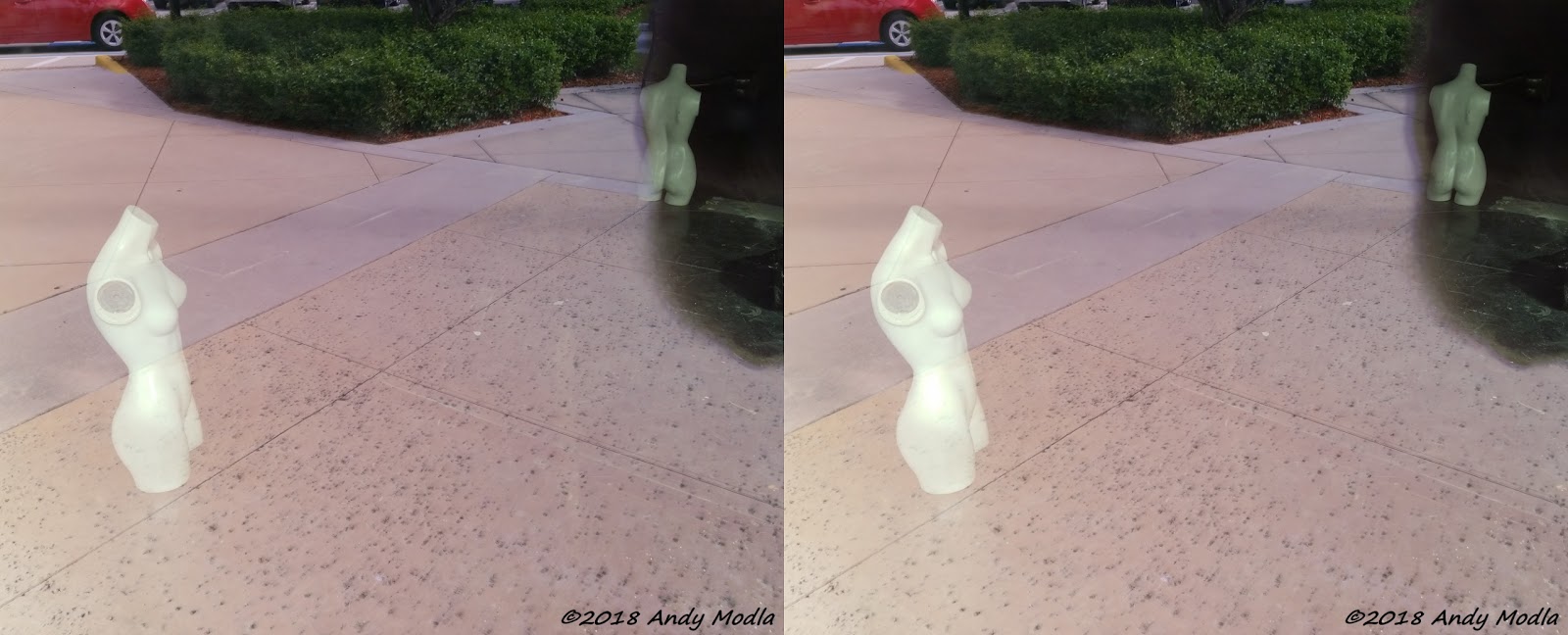
3D Mannequin - But Not Augmented Reality

Reflection with Mannequin
This 3D photo was not created or modified using Photoshop. It was shot with a Samsung S8 smart phone camera using the cha-cha method to serially capture 3D stereoscopic left and right eye views. I used the Open Camera Remote app to help with taking the 3D photo. The L/R photos were aligned, sharpened, text added, and cropped by Stereo Photo Maker, no other changes were made to the images.

The photo is the interior of a retail woman's clothing store that went out of business and they left these two mannequins on the dark floor inside. I shot through the store window and caught the reflections from the street outside. The mannequin on the left was bright enough to overpower the outside light and the mannequin in the back right side was not obscured by the outside light and shows the floor it is standing on.

The 3D photo looks like an augmented reality scene, but it's not computer generated. This photo is possible due to the dark interior of the store.


Tech Update

Marilyn Monroe Seven Year Itch statue at Grounds for Sculpture, Hamilton, NJ, 2017-09-10

This blog is about my explorations at the intersection of Photography, Technology and the Arts. But lately, I am more deeply involved with the Technology universe and neglecting my enthusiasm for making photos. Sometimes tool building gets more attention:


Photography Apps

I publish 8 Android apps in the Google Play Store under my business Tekla Inc. All the apps are free, except for one for purchase 3D/VR Stereo Photo Viewer. It takes a lot of time to update and add new features to these apps that are all related to or connected with photography.

For example, I modified the free open source app Open Camera to create the free Open Camera Remote app. My modifications add remote shutter trigger over a local WiFi network to capture photos and video. You could trigger up to 4093 phones at once to take photos nearly simultaneously if they are all running this app. Think of the possibilities with a large group.

Plus I just added the capability to retrieve photos taken by the Open Camera Remote app using a WEB browser, but only on the local network connected to the phone. And I added a 3D cha-cha mode to take left/right images for creating 3D photos. There is also a new feature that lets you align the scene you are shooting with your previous photo to help with taking 3D (left/right photos), and for creating composite, or stitched photos when you edit your photos using other apps. And my 3D/VR Stereo Photo Viewer app can be launched to view 3D cha-cha photos as well as 2D photos.

And there is a free app, WiFi Remote Capture for signaling the Open Camera Remote app to trigger the shutters of all phone cameras on your local WiFi network running the Open Camera Remote app. 

I am also coding some new apps that may yet be published. These use Processing/Android language, and are photography apps.

Open Source Publications

I continue to add improvements to my free open source contributions for the Processing Cardboard Android platform to use Google VR Cardboard, allowing you to write VR apps written in the Processing/Android language. 

A professor at a woman's high school in California will be using this platform with advanced students to code 3D/VR Android graphics apps.

I also published an open source Stereogram creation tool coded in Processing on GitHub.
And I published an open source Processing Android demo showing how to merge Android apps with Processing. The latest version of Processing SDK supports generation of Android apps that can be combined with Android Studio SDK.

Camera Control Hacks

As an experiment I wired together two Bluetooth selfie shutter release controllers to trigger remote cameras for shooting 3D photos. They required a diode OR circuit for the controller buttons, to allow a single button press to trigger two cameras simultaneously. The conclusion is that you have to use a diode OR circuit to make this work. I captured 3D photos with two smartphones with this controller hack.

3D/VR Photography Meetup

I started a new 3D/VR Photography meetup group in July. It's for 3D photography enthusiasts who want to meet, learn and share how to capture 3D photos and discuss all things stereoscopic. My latest idea for a meetup, for anyone in the world to participate, is to use https://vtime.net, vTime, a social virtual reality network, for members to discuss and view 3D photos using VR headsets. You can find the event announcement at Virtual 3D/VR Meetup.

3D Sunset After Thunderstorm

3D Sunset After Thunderstorm, Andy Modla photographer
Captured with smartphone Samsung S8, using cha-cha method, and edited for alignment with Stereo Photo Maker, and Faststone Image Viewer for resize, exposure, and color.

Left Photo Sunset Thunderstorm

Right Photo Sunset Thunderstorm

Free Viewing QR Code for Google Cardboard VR Apps

Tekla3D Free Viewing QR Code (www.tekla3d.com)
When you use your smartphone screen for VR, it is split screen into left and right eye views. On many smart phones, the center on center distance between the left and right images nearly matches the width of your eyes (inter-ocular spacing). This inter-ocular spacing, on average, is about 2.5 inches (65 mm) horizontal.

Given a phone with this approximate screen dimension (5 to 6 inches), you can freeview 3D stereo side-by-side photos on you phone, similar in ways you would view Magic Eye stereogram puzzles. See my blog posting about free viewing.

With free viewing you do not need to use a VR headset!

I thought it you be helpful to have a QR code that can set your Google VR/Cardboard apps for free-viewing without a VR headset. Basically it tells the app there is very little lens distortion - you are not using a headset! I created the QR code above from the Google Cardboard Viewer Profile Generator.

I tried this setting on my phone with a few Cardboard apps and it works, or example, 3D/VR Reel HGI Fashion app. It may help to have reading glasses to see the phone screen up close. I used +2.0 magnification. I think it helps if the app does not require a lot of head movement. The experience is not a immersive as using a VR headset, but is better for 3D photos.

If you encounter eye strain or any discomfort, do not  free view. Not everyone can do this.

Let me know if this works for you. Good luck!

Italian Cloister Garden Memorial - Cathedral of St. Andrew

Italian Cloister Garden at Cathedral of St. Andrew, 3D parallel photo

Sunday 2017_05_07
Glasgow, Scotland


The Italian Cloister Garden at St. Andrew's Cathedral, Glasgow, Scotland, has a stunning mirrored memorial sculpture, fountain, and two-hundred-year old olive tree (from Tuscany) commemorating the loss of about 800 British-Italian World War II internees. They died in the sinking of the cruise ship Arandora Star torpedoed by the Nazis in 1940 off the coast of Ireland, while on their way to Canada. Each mirrored steel slab, like a gravestone, has gospel quotes on one side and classic Italian poetry on the other.

3D parallel photos


References:

Memorial Information - Italian Cloister Garden

News article about a historical fiction book describing the tradgedy -http://www.barganews.com/2014/02/12/arandora-star-fiction-serves-truth/

Cathedral renovation news - http://www.catholicherald.co.uk/news/2011/04/07/cathedral-receives-a-glorious-makeover/

Clanadonia - Scottish Tribal Drum and Pipes Band


Saturday 2017_05_07
Glasgow, Scotland

Enjoyed a street performance by Clanadonia, a Scottish Tribal Drum and Pipes band.


Sunday 2017_05_07


Next day by chance we encountered Clanadonia musicians having breakfast, so I offered to capture a photo in 3D for them.

Graffiti Artist Fuse in Glasgow

Graffiti Street Painting  by Artist Fuse

Sunday 2017_05_07
Glasgow, Scotland

Walking around downtown Glasgow, on a beautiful sunny day in May, we came across this graffiti street painting. At first I thought it was a Banksy, but later realized it's by the artist Fuse. The painting is located near 48 Miller Street across from the Tobacco Merchant's House (national landmark) at 42 Miller St.


3D parallel photo of Graffiti Street Painting  by Artist Fuse

Here is the painting location photo in 3D stereo. This was my Henri Cartier-Bresson decisive moment 😵 

____________________________________________________________


For more information about the artist Fuse in Glasgow see this article:

https://www.pressreader.com/uk/evening-times/20160813/281702614112234

You can see a Google street view showing the blank wall on the right of the photo here:

https://www.google.com/maps/@55.8588756,-4.250973,3a,60y,215.71h,99.75t/data=!3m6!1e1!3m4!1smI86oEl35_eCmsEhVLQ22w!2e0!7i13312!8i6656


This Photo Makes Sense in 3D


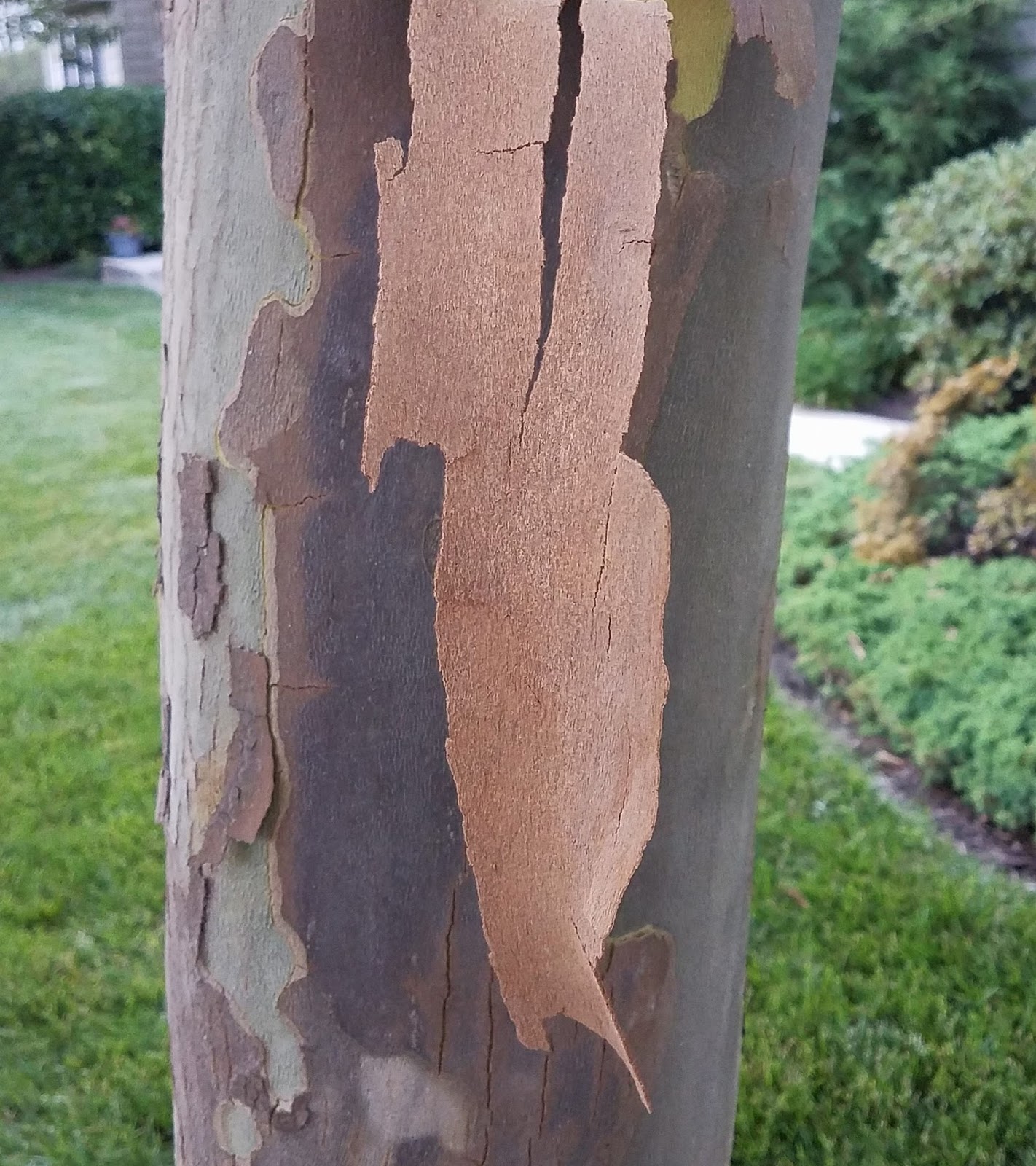
Today I captured this photo of tree bark with my phone camera. It's a peeling American Sycamore tree. Looking at this 2D photo may be puzzling. The question is you don't know for sure if the center section is where the bark had already peeled away or not. Looking at the tree straight on with one eye closed does not answer the question. You could circle the tree with one eye closed but that's not an option.


In this parallel (side by side) 3D photo you can clearly see that the peeling bark has not dropped off the tree yet. It is about 35 cm long (14 inches). 


In this second 3D photo you can see where the bark peel away revealing green bark underneath. The bark peel is curved.

More information about Sycamores can be found at https://www.nycgovparks.org/news/daily-plant?id=19242

I shot the 3D photos using the cha-cha method captured with the Open Camera Remote app on a Samsung S7 phone. The camera app was launched from my 3D/VR Stereo Photo Viewer app. I had to wait for a windless early evening to use the cha-cha technique.

Next I aligned the left and right photos I captured with Stereo Photo Maker software. For the most comfortable stereo effect I placed the peeling bark just behind the stereo viewing window (phone display screen). Then I copied the aligned photos back to my phone for viewing with the 3D/VR Stereo Photo Viewer. 

Here I post the largest resolution photo size from the camera with cropping, so you can zoom in to see the bark in great detail. In 3D it's very realistic. Sometimes I think 2D photos are boring.

Lake Worth Street Painting Festival 2017

Street Painting Artist
A large group of street painting artists, working with ephemeral chalk, gathered in Lake Worth, Florida, February 25-26, to draw their paintings on the pavement during the Lake Worth Street Painting Festival. We went mid-day Sunday and many works were not yet finished. It was an amazing show of street art stretching for blocks and blocks of Lake Worth. My goal as a 3D photographer was mainly to show the artists at work, the spectators, but not always the completed painting.

I especially like photo above because the sun highlighted the partially finished work, while showing the artist's work-in-progress and inspiration source material in contrast. It may look flat in 2D, but I think it looks good in 3D because the depth perception further defines and contrasts the artist, chalk materials, drawing method, shading umbrella, and art work.


To capture these photos, I used twin Samsung NX500 cameras with Samsung 16 mm prime lenses and circular polarized filters (24 mm equivalent to 35 mm full frame cameras). Several people asked me about the camera rig. It uses a wired shutter release and each camera was set to F8, 1/160 with variable auto ISO.


More Work-in-Progress.....


Tracy Lee Stum
Tracy Lee Stum, from California, autographed her book "The Art of Chalk" for me. She painted the 3D anamorphic chalk art of the ironworkers on the beam above.


An example of 3D anamorphic Chalk Art by Rod Tryon, Street Painter 


I wonder if the above 3D photo of 3D anamorphic art looks more realistic when viewed stereoscopic? With Stereo Photo Maker I adjusted the stereo window to center on the spider's head (middle ground with zero parallax). This helped make the spider's web appear over the opening.


Street performance artist Randy Orwig at work.

More 3D photos from the festival are here:


On your Android phone copy this link above into the clipboard and view 3D photos with my 3D/VR Stereo Photo Viewer app in your Google Cardboard VR headset.

#lakeworthstreetpaintingfestival